If you are a Landbank account holder, you can now conveniently do bank transactions online through the LBPIAccess or Retail Internet Banking Portal for Landbank and Overseas Filipino Bank (OFBank). It is the online banking facility of the Landbank of the Philippines and its subsidiary, the Overseas Filipino Bank. You can check your account balance, pay bills, or transfer money to other accounts 24/7 even without personally going to the bank.
What is Landbank?
The Landbank of the Philippines is the second-largest bank in the country in terms of assets. As of 2020, it has an estimated asset of ₱2.2 trillion making it one of the biggest government-owned and controlled corporations in the Philippines. It is founded on August 8, 1963, to cater to the needs of farmers and fishermen while providing the services of a universal bank. Most government employees in all agencies received their payroll through Landbank. That is why you can find a Landbank ATM in every city hall or town hall all over the Philippines.
How to Enroll in Landbank iAccess
There are two ways to apply for the Landbank iAccess online banking, online or at the nearest Landbank branch. All individual depositors excluding passbook accounts are eligible to enroll in Landbank iAccess facility.
Online Enrollment
This option is applicable only to ATM accounts and limited to non-monetary transactions only. It means you can only use it to view your account balance and transaction details, inquire about the status of the check/s you issued and report your lost/stolen ATM card. Hence, you cannot use it to pay bills and transfer funds to another account. To enroll online, follow the instructions below.
1. Using a computer with a good internet connection and your favorite browser, go to the Landbank iAccess portal through this URL: https://www.lbpiaccess.com
2. On the landing page, click the Sign-up Now link at the left corner of the screen.
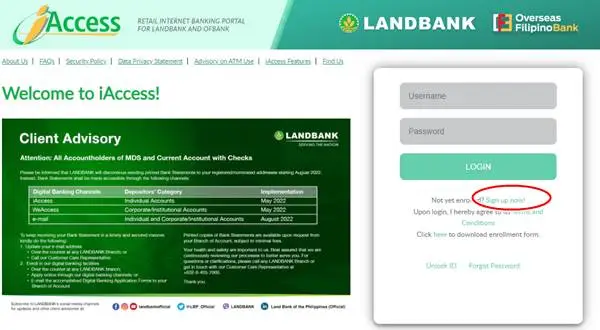
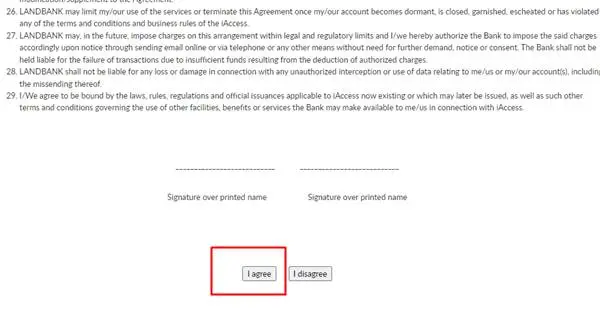
3. Read the terms and conditions, scroll down to the bottom using the scroll bar then click the “I Agree” button.
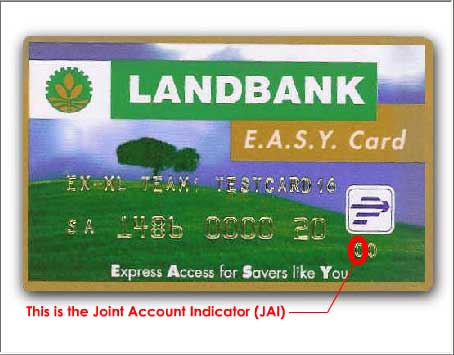
4. Fill out the application form properly. Those items marked with an asterisk (*) are required. You can type in n.a. if these items are not applicable. Do not forget your answers to the security questions. For the JAI or the Joint Account Indicator, enter “0” for a single/individual account, and “1” or “2” for a joint account.
5. At the bottom of the page, provide your desired LBPiAccess ID. Remember this ID, write it down or take a picture. This will be your log-in access to your LBP Online account. Click the I am not a robot button to prove that you are a human and not an automated bot.
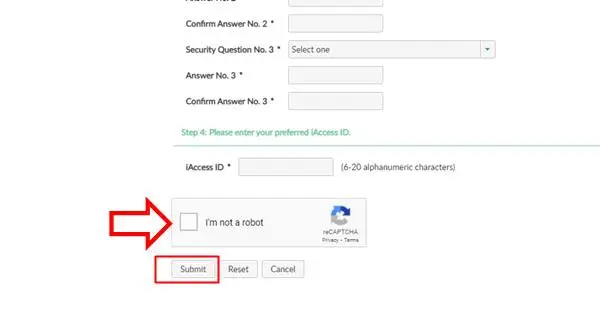
5. Review all the information you’ve entered then click the Submit button to continue to the next step.
6. You will now be redirected to a page telling you that you’ve successfully enrolled for the Landbank iAccess.
Landbank Branch Enrollment
Enrollment through your local Landbank branch is applicable to both ATM and Current accounts. Unlike the online application method, you can use it for non-monetary or monetary transactions or both. It means you can also pay bills and transfer money to other accounts using the Landbank iAccess online banking facility. To enroll, follow the steps below:
- Go to the nearest Landbank branch and bring a valid ID, landbank ATM card, and your account number.
- Proceed to the New Accounts section and tell the officer that you want to apply for the Landbank iAccess. He/she will give you a Landbank iAccess Enrollment and Maintenance Agreement (LI-EMA) form. If you have multiple accounts in Landbank, you can access them through a single iAccess account.
- Submit the duly-accomplished and signed LI-EMA form to the officer.
- He/she will now process the form and other documents then will tell you the date of activation of your iAccess account. Just wait and follow the officer’s further instructions.
Conclusion
Bank transactions have never been easier with the Landbank iAccess internet banking. You can now pay bills, view the account balance, and transfer funds with just a click of a mouse. Keep in mind that only individual or joint “or” accounts can be enrolled for fund transfer transactions. Joint “and” accounts are limited to viewing or non-monetary transactions only. Fund transfer is likewise limited to LANDBANK ATM Accounts (Savings & Current) and Regular Current Accounts only. Fund transfer transactions to other banks are not yet available as of this moment.
Ilang beses na sinasabing answers to security question 1 does not match with security question 1. Pag okay naman na, ying 2 or 3 naman ang di nagmamatch. Pag nagmatch na sina 2 and 3, balik naman kay 1.
What’s wrong?
Lbp has got to do something about this pls.
Try registering in the mobile app – cant receive the OTPs on time.
Tried registering through chome web – CAPTCHA error and wont show despite chrome settings adjustment/s.
same
Nakailang ulit na po ako mag sign up an account but still hindi pa rin makapasok sa online mobile banking. Diko alam bakit ang hirap pasukin.
Ilang try ko na invalid daw pin ko kahit tama naman then after that po ngtry po ulit ako ngyon exceeded n dw po sa allowed na sa times ng type of pin.please help..thank you..
Pang-apat ko na mag enroll sa i-access laging Rejected – Profile not match, anong gagawin pag ganyan?
Nag apply ako online pero until now mag 5 days na wala parin ako narereciv na online confirmation galing sa bank. I tried to call the branch, pati customer care, emailed them pero walang sagot. I just need to open the mobile app to check if pumasok na ang sahod para di ma-waste time ko pumunta sa atm. Any idea?
Pang apat kuna to pag sisign up pero hangang ngayon hindi parin ako makapasok.
nag fill-up kona po iaccess form tru this online at bakit di pa rin ako maka pasok sa iaccess
Why I can’t enroll? when i click confirm it said that my acct no is wrong
thank you for this info. really help a lot.
Pano po magka iaccess account
paano po kaya magre enroll kasi ung sakin ayaw tanggapin ung answer ko dun sa 3questions na dapat sagutan kahit un naman talaga sagot q.. pede po kaya magregister ukit ng panibago para makkuha ng OTP
bakit po yung sakin invalid, “account number is currently enrolled as own deposit account” pa help po
Ganito din yung account ko. Pa help naman poh
Same problem din po.
Im trying to enroll my account in iaccess but I cant input the JAI kasi isang number lang ang pwede iinput. 4numbers po ang nasa atm card.
For the JAI or the Joint Account Indicator, enter “0” for single/individual account, “1” or “2” for joint account.
Panu po pla if inactive na un naiencode ko at naisend na gmail at panu po papalitan nun active na gmail ko ngayon. salamat po sa response.
don’t worrry kasi once na hindi mo maconfirm ung email nla within 48 hrs, maeexpire un, so reregister ka na naman ulit po.
Pwede po bang i enroll din sa iaccess yung umid card na yung bank eh landbank parin?
Paano po kung sakaling pwede?
Pano po kung nakalimutan ang iaccess id?
Okey lang ba yun sir? Same scenario e.
sabi niya sakin is your card is bla bla bla to deposit account. ano yun? paano yun? I tried many time and wanting for codes via email until today pero wala. How was that. grrrrr
I tried to register online for my iacess but it prompts that my card is enrolled as own deposit account. What do I have to do then?
SAME HERE
i tried may times but to no avail. “Invalid Card Number” always pops up every after registration. frustrating
Same here, I have two accounts with no iacces.
Ilang beses na po ako nagpunta sa landbank branch at nag-apply ng iaccess..wala lang po akong nareceive ni isang confirmation,.
Same din po tayo.. tagal ko din po nag hintay. Pero hanggang ngaun wala parin po . Naka init lng ng ulo
Same here. Hindi pna man nkapag email ang landbank sa akn. Sabi 2 days mkatanggap ka ng email to activate your iaccess account pero hanggang ngayon wala parina kong ntanggap. Hindi po ba maapektuhan laman ng atm ? Bka kasi mabwasan o d kaya mwala yung pera sa atm.
We have the same situation ganyan rin yung sakin.
Gaano po ba katagal sinesend ung email for activation? Nakapag-online registration na kasi ako pero hanggang ngayon wala pa rin akong narereceive na email.
Tumagal yung sakin ng 1 month pero wala pa din ako narereceive na email. After that, I went to the branch where I created my account. I inquired regarding the same problem. They asked for my ATM card and a valid ID and said that they are working on to confirm my online registration. After 20 minutes, they gave back my ATM card and valid ID and said that my iAccess is now working.
The answer is incorrect. Please try again.
ganito po lagi nalabas pg ngconfirm,ay ang alam ko po tama naman ung 3 questions ko na sinagutan.
same po tau!
Same po tayo. Kanina lang ako nag apply pero nakailang ulit na ako ni refresh ko na yung page still the same. Nakakainit ng ulo.
I just did mine earlier and wala naman akong naging problem, pero upon reading sa mga comments dito most of them complaining in things na actually mababasa mo sya upon processing your account.
Poor reading comprehension guys, Hindi ako employee ng landbank pero nakakainit ng ulo yung mga nagcocomment dito na hindi nagbabasa ng maayos jusko
ask ko lng po kelan po nio isend sa email add ko ang iaccess id ko?
I registered already, however i do not know my password, how to know the password because as far as i know, the form didn’t asked for password until its succesful registration…
nka pag iaccess nga wala naman sa option ang fund transfer..nung tumawag ako sa customer service ang sabi go to the nearest bank..nung nagpunta sa nearest bank di nila makita sa system nila kasi d naman aq sa kanila nagpagwa ng iaccess account..hay naku! paano magkaroon ng option nang fund transfer..
thru online enrollment ginawa..nag succeed nga kaso walang fund transfer na option..
Yung OTP naexpire without activating my lbpiaccess… may pinagawa sila sa akin thru link… Click the link… write your iAccess ID… leave the activation code blank… then click… REGENERATE OTP… please click OK to confirm… pero ang lumalabas pa din… “Invalid Activation Status”… Kumausap na ako ng tagaLBP. Wala pa din. 🙁
Hi may I ask if na activate mona account ko? I have the Same problem kase. Thanks.
POOR COSTUMER SERVICE!
my otp didnt work and it says x remaining for trial
why is it, INVALID CARD NUMBER?, Kahit tama naman ung nilagay ko naka ilang ulit na ako ganon pa rin
sakin din ganyan kainis
Hi po ask ko lang kung naayos na yung problem mo po sa Invalid Card Number? Thanks
just like mine…so disappointing
How to enroll iaccess?
Error
Panu ko po ma activate ung inenroll ko sa online iaacess maam/sir wla po ako natanggap sa email ko na link for activation. Thanks
Same
no email was sent to my acct…..
Pano ako makaactivate? Walang dmating link sa email ko ?
Same here :'(
I already enrolled. Pro bat po ganon? Ni wala akong natanggap na link sa Email ko, paano ko ma aactivate tong IACCESS ko if wala pa pong dumadting sa email ko.
Ganun din po ako ?
Same. Called their customer service and she said na 2-3 days pa daw kasi waiting for approval pa.
Were you able to receive approval of enrolment after 2-3 days po?
panu po wala pko iaccess id till nw
poor website!!!! di marunong mga IT gumawa nito. ni wala man lang instructions or confirmation kung ok na ba yung na register na account ko. NOT USER FRIENDLY!!! try to visit metrobank app sometimes para may idea naman kayo kung paano gumana ng website/mobile app!!! nakaka highblood!
i already enrolled many times on this iaccess but received nothing kahit confirmation man lang or activation . wala eh . nakakadisappoint
Hello good morning ,can i ask how to change username and password ?, becoz my husband iaccess account cant open ,bcoz he forgot the username and password please reply thank you …
lbp says…
Account number is currently enrolled as own Deposit Account.
what is that mean?
Mine appears like that too, what should I do?
same with my dad’s. how were you able to resolve it?
I’m having the same problem. How to resolve this?
ow shit same problem, no email replies sila
all i get is “INVALID CARD NUMBER”???????
sa akin ano kaya problima tama naman nilagay ko
I cant find my user name? Because everytime i submit the reply is invalid username
i tried to create a user account and follow the instructions on your website. it was successful but when i tried to open my user account in mobile banking, it says “not yet approved”. How can i use/open my account on phone?
its a piece of craft account mo na sobrang complicated and dami kailangan not like other bank online access easy steps dito ang dami mo kailangan gawin wla naman email na dumating
my iaccess id is invalid even though i enter the same access id name upon registration?
I double check my email add and im 101% sure that it is correct. Why is it everytime i submit my application the reply is incorrect email add..
Applied since January, received an automated email that they are still checking on it and after that, haven’t received any updates from them since then.
Your enrolment app sucks. It is not user friendly. It’s the worst online enrolment application that I have used. Change your developer or programmer.
I tried to access my account but it says “not yet approved”. Its been 3 days since i registered for iAccess. Thanks pls reply
i forgot my the answer to my security question challenge?
how could i resolve it. please help me thank you
\
My email was wrong. Should be
@gmail.com
I placed
@alj.com
How to rectify?
I cannot unlock my access id, because it says that I’m my account is not activate. How? Its because I register already on Iaccess enrollment.?Please answer. Thank you.
Have you received an email yet maam? I also applied online 3 days ago and have not received a response until now.
thru land bank I registered my account do i need to go to ATM machine to validate my card.
registered account do i need to go to ATM machine to validate my card.
i enroll my online account and has been registered already but i still not receive any activation at land bank.
How to apply online?
I cant find JAI .
Kelan Po kaya marerexieve ung activation code pra sa pag enrol ng iaccess?
Matagal na po akong nag aplay ng iaccess and sabi 24 hours lang hanggang ngayon hindi pa rin approve ang application ko
I already enrolled but i cannot activate my account because of OTP.. I already tried many times but it keeps on popping out “session expired until please request another otp at your branch
OTP code I enter is always invalid. How can I fix this??
Is there an activation fee for i access?
I already applied for LandBank I-Access last week. (Thursday) and I was told that it will take 24 hours … How will I know that I can already use IAccess? I was told that a message will be sent to my email ad. . Until now, none was received by me. Thankyou .
I cannot put my pin. Y?
Me too…
I already enrolled in iaccess but still i havent recieve my one time pin…how can i retrieve my pin? Thanks for the positive response
Cant finish my enrollment , how can i complete my enrollment with this issue if ur sytem always answer “INCORRECT DATA” even if i enter my username and password correctly…
Dn WHY is it that when i get a new code q.. Ican recieve it on the next day or following day?…
Waste of tym and data
Almost three weeks i didnt finish it
Where can I get the iacces ID number?
I don’t recieve any confirmation. What to do about this?
No mail was sent to me after registration..its been 3 weeks from now from my registration..pls help..
site cant be reached
my account has been registered via online but the reply needs approval. i call land bank support desk online but the answer wait for email reply.
May na recieve kana po bang email from landbank para ma approve application mo sa iaccess? Ilang days mo po na recieve?
What happened landbank..?? I can’t open my account. And there’s no email that has been sent regarding the activation of my account.
how to register.. .??
What if my OTP already expired before activation, can i get another OTP?
Cant activate my account even if i put the correct answer it always says that my answer is incorrect..
Me too. I even wrote down my answers just so I won’t forget them. And yet, still getting “incorrect answers”.
same here po,ano pa po kaya dapat gawin?tnx po
How to register?
I already enrolled but i cannot activate my account because of OTP.I was told that a message will be sent to my email ad. . Until now, none was received by me. So i decided to use another device but it responds that my account is being used..
I enroll iaccess online but my new ATM card has no JAI, where can i find JAI in a new ATM card?
put 00 thats what landbank said. i also use it for paying online for my bir
Where can I find that JAI?
can’t login to Iaccess because of that JAI ???
how to reset user name & password
how to rest username & password on line
STILL I CANNOT ACCESS MY ACCT. DESPITE FOLLOWING THE INSTRUCTION OF LBP STAFF …
you have to go to your branch of account if your going to use it for online payment specially for government transaction payment like BIR they have to manually activate your account. that’s what happen to me when i enroll and activate my account
why i have an invalid card number.. they never ask for my card number ..it ask for my account number
Does this work on Standard ATM Cards? Or just with VISA? It says my account number is invalid.
How to register
it always says I already exceeded in the number of tries. So how many days or hours do I nees to wait? or Does this mean I can no longer access it?
I entered an incomplete email add during my online registration how can i edit as i will not received the email verification. Pls help
hi! after how many days did u received the confirmation email?
I enrolled i access online but until now i havent received a confirmation or email. Thank you
How to enroll in that iaccess i try many times but it always show that invalid password or user id..please help me…do something about this..
I already enrolled in iaccess in one of the branch here in our place, the officer told me to wait an email for my password until now no email have been sent, please help me. Thank you and more power..
Check the spam folder.
Cant finish my enrollment since i need to fill up a tin number which i dont have, how can i complete my enrollment with this issue
How do I apply?
how to register?